> ## Documentation Index
> Fetch the complete documentation index at: https://dub-mintlify-update-supabase-lead-tracking-guide-82850.mintlify.site/llms.txt
> Use this file to discover all available pages before exploring further.
# Supabase
> Learn how to track lead conversion events with Supabase and Dub
Conversion tracking requires a [Business plan](https://dub.co/pricing)
subscription or higher.
When it comes to [conversion tracking](/conversions/quickstart), a `lead` event happens when a user performs an action that indicates interest in your product or service. This could be anything from:
* Signing up for an account
* Booking a demo meeting
* Joining a mailing list
 In this guide, we will be focusing on tracking new user sign-ups for a SaaS application that uses Supabase for user authentication.
## Prerequisites
First, you'll need to enable conversion tracking for your Dub links to be able to start tracking conversions:
If you're using [Dub Partners](/partners/quickstart), you can skip this step
since partner links will have conversion tracking enabled by default.
To enable conversion tracking for all future links in a workspace, you can do the following:
To enable conversion tracking for all future links in a workspace, you can do the following:
1. Navigate to your [workspace's Analytics settings page](https://app.dub.co/settings/analytics).
2. Toggle the **Workspace-level Conversion Tracking** switch to enable conversion tracking for the workspace.
In this guide, we will be focusing on tracking new user sign-ups for a SaaS application that uses Supabase for user authentication.
## Prerequisites
First, you'll need to enable conversion tracking for your Dub links to be able to start tracking conversions:
If you're using [Dub Partners](/partners/quickstart), you can skip this step
since partner links will have conversion tracking enabled by default.
To enable conversion tracking for all future links in a workspace, you can do the following:
To enable conversion tracking for all future links in a workspace, you can do the following:
1. Navigate to your [workspace's Analytics settings page](https://app.dub.co/settings/analytics).
2. Toggle the **Workspace-level Conversion Tracking** switch to enable conversion tracking for the workspace.
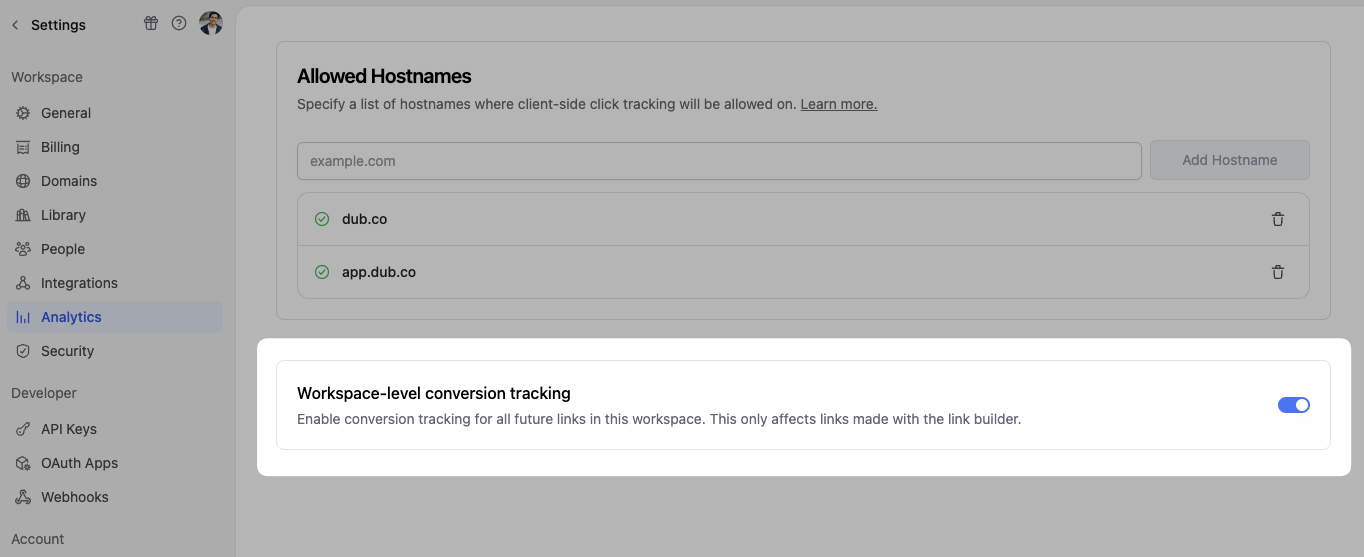 This option will enable conversion tracking in the [Dub Link Builder](https://dub.co/help/article/dub-link-builder) for all future links.
If you don't want to enable conversion tracking for all your links in a workspace, you can also opt to enable it on a link-level.
To enable conversion tracking for a specific link, open the [Dub Link Builder](https://dub.co/help/article/dub-link-builder) for a link and toggle the **Conversion Tracking** switch.
This option will enable conversion tracking in the [Dub Link Builder](https://dub.co/help/article/dub-link-builder) for all future links.
If you don't want to enable conversion tracking for all your links in a workspace, you can also opt to enable it on a link-level.
To enable conversion tracking for a specific link, open the [Dub Link Builder](https://dub.co/help/article/dub-link-builder) for a link and toggle the **Conversion Tracking** switch.
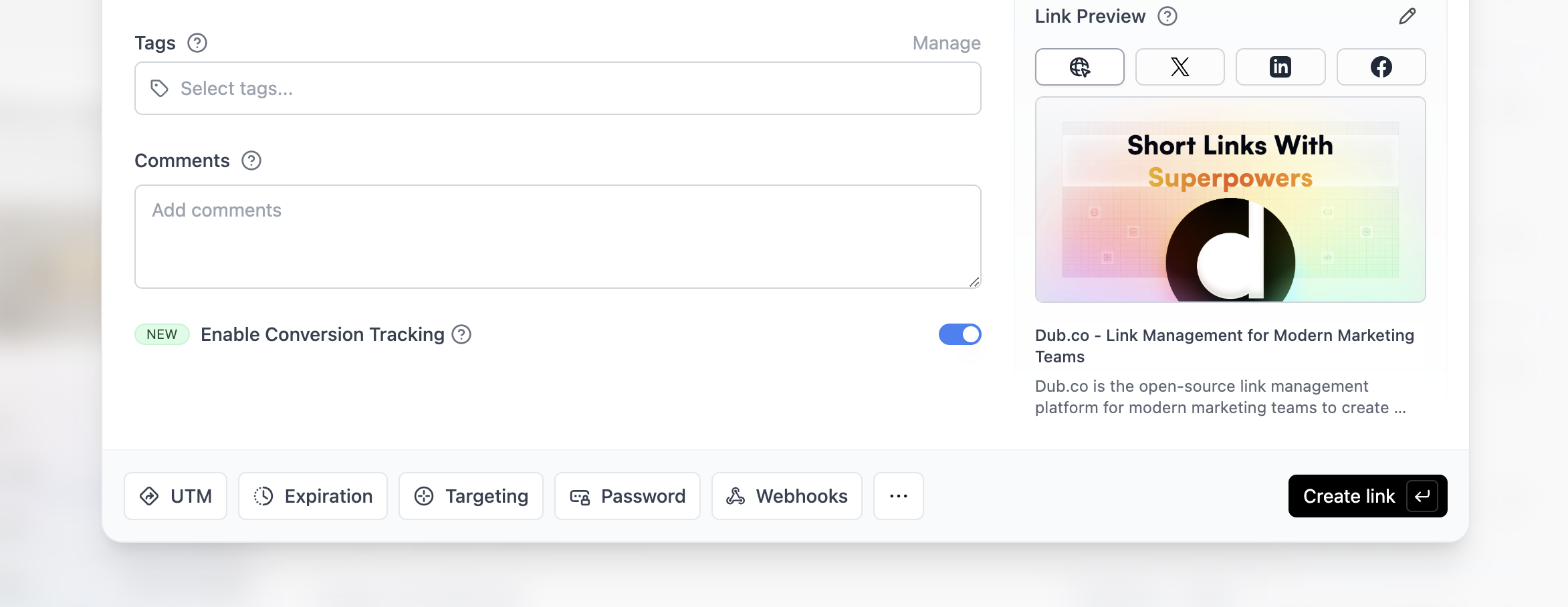 You can also use the `C` keyboard shortcut when inside the link builder to
quickly enable conversion tracking for a given link.
Alternatively, you can also enable conversion tracking programmatically via the [Dub API](/api-reference/introduction). All you need to do is pass `trackConversion: true` when creating or updating a link:
```javascript Node.js
const link = await dub.links.create({
url: "https://dub.co",
trackConversion: true,
});
```
```python Python
link = d.links.create(url="https://dub.co", track_conversion=True)
```
```go Go
link, err := d.Links.Create(ctx, &dub.CreateLinkRequest{
URL: "https://dub.co",
TrackConversion: true,
})
```
```ruby Ruby
s.links.create_many(
::OpenApiSDK::Operations::CreateLinkRequest.new(
url: "https://dub.co",
track_conversion: true,
)
)
```
Then, you'd want to install the `@dub/analytics` script to your website to track conversion events.
You can install the `@dub/analytics` script in several different ways:
}
href="/sdks/client-side/installation-guides/framer"
horizontal
/>
You can **verify the installation** with the following tests:
1. Open the browser console and type in `_dubAnalytics` – if the script is installed correctly, you should see the `_dubAnalytics` object in the console.
2. Add the `?dub_id=test` query parameter to your website URL and make sure that the `dub_id` cookie is being set in your browser.
If both of these checks pass, the script is installed correctly. Otherwise, please make sure:
* The analytics script was added to the `` section of the page
* If you're using a content delivery network (CDN), make sure to purge any cached content
## Configure Supabase
Next, configure Supabase to track lead conversion events. The implementation depends on your authentication flow:
## Auth callback implementation
For OAuth providers (Google, GitHub, etc.) and email signup with verification enabled, implement the `/auth/callback` route:
1. In the `/api/auth/callback` route, check if:
* the `dub_id` cookie is present.
* the user is a new sign up (created in the last 10 minutes).
2. If the `dub_id` cookie is present and the user is a new sign up, send a lead event to Dub using `dub.track.lead`
3. Delete the `dub_id` cookie.
```typescript Next.js App Router
// app/api/auth/callback/route.ts
import { cookies } from "next/headers";
import { NextResponse } from "next/server";
import { createClient } from "@/lib/supabase/server";
import { waitUntil } from "@vercel/functions";
import { dub } from "@/lib/dub";
export async function GET(request: Request) {
const { searchParams, origin } = new URL(request.url);
const code = searchParams.get("code");
// if "next" is in param, use it as the redirect URL
const next = searchParams.get("next") ?? "/";
if (code) {
const supabase = createClient(cookies());
const { data, error } = await supabase.auth.exchangeCodeForSession(code);
if (!error) {
const { user } = data;
const dub_id = cookies().get("dub_id")?.value;
// if the user is created in the last 10 minutes, consider them new
const isNewUser =
new Date(user.created_at) > new Date(Date.now() - 10 * 60 * 1000);
// if the user is new and has a dub_id cookie, track the lead
if (dub_id && isNewUser) {
waitUntil(
dub.track.lead({
clickId: dub_id,
eventName: "Sign Up",
customerExternalId: user.id,
customerName: user.user_metadata.name,
customerEmail: user.email,
customerAvatar: user.user_metadata.avatar_url,
})
);
// delete the clickId cookie
cookies().delete("dub_id");
}
return NextResponse.redirect(`${origin}${next}`);
}
}
// return the user to an error page with instructions
return NextResponse.redirect(`${origin}/auth/auth-code-error`);
}
```
```typescript Next.js Pages Router
// pages/api/auth/callback.ts
import { NextApiRequest, NextApiResponse } from "next";
import { createClient } from "@supabase/supabase-js";
import { dub } from "@/lib/dub";
export default async function handler(
req: NextApiRequest,
res: NextApiResponse
) {
const { code, next = "/" } = req.query;
const origin = `${req.headers["x-forwarded-proto"]}://${req.headers.host}`;
if (typeof code === "string") {
const supabase = createClient(
process.env.NEXT_PUBLIC_SUPABASE_URL!,
process.env.SUPABASE_SERVICE_ROLE_KEY!
);
const { data, error } = await supabase.auth.exchangeCodeForSession(code);
if (!error) {
const { user } = data;
const { dub_id } = req.cookies;
// if the user is created in the last 10 minutes, consider them new
const isNewUser =
new Date(user.created_at) > new Date(Date.now() - 10 * 60 * 1000);
// if the user is new and has a dub_id cookie, track the lead
if (dub_id && isNewUser) {
dub.track
.lead({
clickId: dub_id,
eventName: "Sign Up",
customerExternalId: user.id,
customerName: user.user_metadata.name,
customerEmail: user.email,
customerAvatar: user.user_metadata.avatar_url,
})
.catch(console.error); // Handle any errors in tracking
// delete the clickId cookie
res.setHeader(
"Set-Cookie",
`dub_id=; Path=/; Expires=Thu, 01 Jan 1970 00:00:00 GMT`
);
}
return res.redirect(`${origin}${next}`);
}
}
// return the user to an error page with instructions
return res.redirect(`${origin}/auth/auth-code-error`);
}
```
## Email signup without verification
The `/auth/callback` route handles most authentication conditions **except** normal user signup with email when email verification is disabled. For this flow, you need to add tracking code directly to your signup page.
When email verification is disabled, users are immediately signed in after signup without going through the `/auth/callback` route. Add the tracking code directly to your signup form handler:
```typescript Server action (App Router)
// app/actions/auth.ts
'use server';
import { cookies } from 'next/headers';
import { createClient } from '@/lib/supabase/server';
import { dub } from '@/lib/dub';
import { redirect } from 'next/navigation';
export async function signUp(formData: FormData) {
const email = formData.get('email') as string;
const password = formData.get('password') as string;
const supabase = createClient(cookies());
const { data, error } = await supabase.auth.signUp({
email,
password,
});
if (error) {
throw new Error(error.message);
}
// Track the lead conversion if signup was successful
if (data.user) {
const dubId = cookies().get('dub_id')?.value;
if (dubId) {
await dub.track.lead({
clickId: dubId,
eventName: 'Sign Up',
customerExternalId: data.user.id,
customerEmail: data.user.email,
customerName: data.user.user_metadata?.name,
customerAvatar: data.user.user_metadata?.avatar_url,
});
// Delete the dub_id cookie
cookies().delete('dub_id');
}
}
redirect('/dashboard');
}
```
```typescript API route (Pages Router)
// pages/api/auth/signup.ts
import { NextApiRequest, NextApiResponse } from 'next';
import { createClient } from '@supabase/supabase-js';
import { dub } from '@/lib/dub';
export default async function handler(
req: NextApiRequest,
res: NextApiResponse
) {
if (req.method !== 'POST') {
return res.status(405).json({ error: 'Method not allowed' });
}
const { email, password } = req.body;
const supabase = createClient(
process.env.NEXT_PUBLIC_SUPABASE_URL!,
process.env.SUPABASE_SERVICE_ROLE_KEY!
);
try {
const { data, error } = await supabase.auth.signUp({
email,
password,
});
if (error) throw error;
// Track the lead conversion if signup was successful
if (data.user) {
const { dub_id } = req.cookies;
if (dub_id) {
await dub.track.lead({
clickId: dub_id,
eventName: 'Sign Up',
customerExternalId: data.user.id,
customerEmail: data.user.email,
customerName: data.user.user_metadata?.name,
customerAvatar: data.user.user_metadata?.avatar_url,
});
// Delete the dub_id cookie
res.setHeader(
'Set-Cookie',
'dub_id=; Path=/; Expires=Thu, 01 Jan 1970 00:00:00 GMT'
);
}
}
res.status(200).json({ user: data.user });
} catch (error) {
res.status(400).json({ error: error.message });
}
}
```
Here's the full list of attributes you can pass when sending a lead event:
| Property | Required | Description |
| :------------------- | :------- | :-------------------------------------------------------------------------------------------------------------------------------------------------------------------------------------------------------------------------------------------------------------------------------------------------------------------------------------------------------------------------------- |
| `clickId` | **Yes** | The unique ID of the click that the lead conversion event is attributed to. You can read this value from `dub_id` cookie. If an empty string is provided (i.e. if you're using [tracking a deferred lead event](/conversions/leads/deferred)), Dub will try to find an existing customer with the provided `customerExternalId` and use the `clickId` from the customer if found. |
| `eventName` | **Yes** | The name of the lead event to track. Can also be used as a unique identifier to associate a given lead event for a customer for a subsequent sale event (via the `leadEventName` prop in `/track/sale`). |
| `customerExternalId` | **Yes** | The unique ID of the customer in your system. Will be used to identify and attribute all future events to this customer. |
| `customerName` | No | The name of the customer. If not passed, a random name will be generated (e.g. "Big Red Caribou"). |
| `customerEmail` | No | The email address of the customer. |
| `customerAvatar` | No | The avatar URL of the customer. |
| `mode` | No | The mode to use for tracking the lead event. `async` will not block the request; `wait` will block the request until the lead event is fully recorded in Dub; `deferred` will defer the lead event creation to a subsequent request. |
| `metadata` | No | Additional metadata to be stored with the lead event. Max 10,000 characters. |
## Example App
To learn more about how to track leads with Supabase, check out the following example app:
Check out a real-world example of this in action – Extrapolate uses Supabase
Auth and Next.js App Router to track new user sign-ups.
## View your conversions
Once you've completed the setup, all your tracked conversions will show up in [Dub Analytics](https://dub.co/analytics). We provide 3 different views to help you understand your conversions:
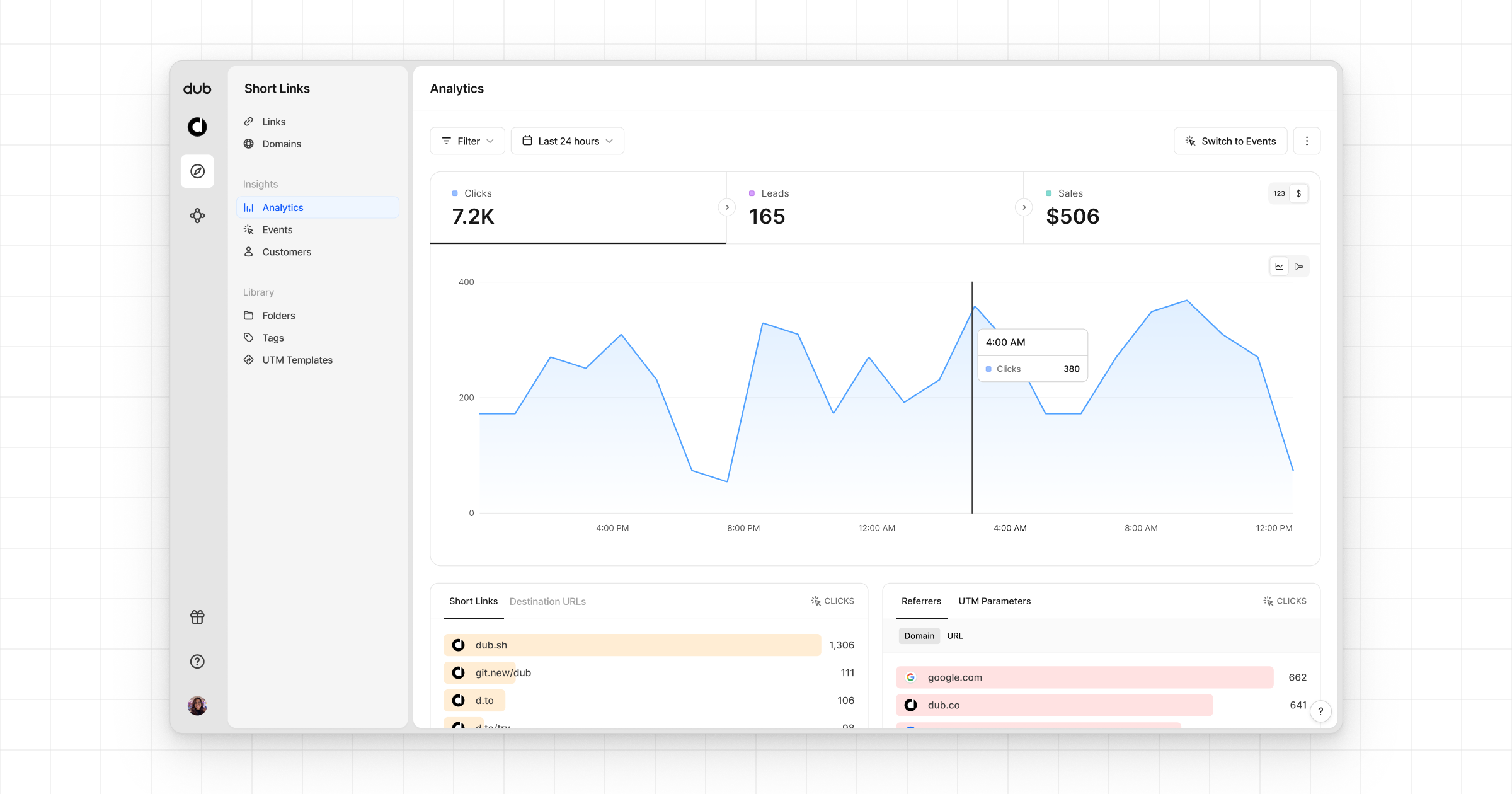
* **Time-series**: A [time-series view](https://app.dub.co/dub/analytics?view=timeseries) of the number clicks, leads and sales.
You can also use the `C` keyboard shortcut when inside the link builder to
quickly enable conversion tracking for a given link.
Alternatively, you can also enable conversion tracking programmatically via the [Dub API](/api-reference/introduction). All you need to do is pass `trackConversion: true` when creating or updating a link:
```javascript Node.js
const link = await dub.links.create({
url: "https://dub.co",
trackConversion: true,
});
```
```python Python
link = d.links.create(url="https://dub.co", track_conversion=True)
```
```go Go
link, err := d.Links.Create(ctx, &dub.CreateLinkRequest{
URL: "https://dub.co",
TrackConversion: true,
})
```
```ruby Ruby
s.links.create_many(
::OpenApiSDK::Operations::CreateLinkRequest.new(
url: "https://dub.co",
track_conversion: true,
)
)
```
Then, you'd want to install the `@dub/analytics` script to your website to track conversion events.
You can install the `@dub/analytics` script in several different ways:
}
href="/sdks/client-side/installation-guides/framer"
horizontal
/>
You can **verify the installation** with the following tests:
1. Open the browser console and type in `_dubAnalytics` – if the script is installed correctly, you should see the `_dubAnalytics` object in the console.
2. Add the `?dub_id=test` query parameter to your website URL and make sure that the `dub_id` cookie is being set in your browser.
If both of these checks pass, the script is installed correctly. Otherwise, please make sure:
* The analytics script was added to the `` section of the page
* If you're using a content delivery network (CDN), make sure to purge any cached content
## Configure Supabase
Next, configure Supabase to track lead conversion events. The implementation depends on your authentication flow:
## Auth callback implementation
For OAuth providers (Google, GitHub, etc.) and email signup with verification enabled, implement the `/auth/callback` route:
1. In the `/api/auth/callback` route, check if:
* the `dub_id` cookie is present.
* the user is a new sign up (created in the last 10 minutes).
2. If the `dub_id` cookie is present and the user is a new sign up, send a lead event to Dub using `dub.track.lead`
3. Delete the `dub_id` cookie.
```typescript Next.js App Router
// app/api/auth/callback/route.ts
import { cookies } from "next/headers";
import { NextResponse } from "next/server";
import { createClient } from "@/lib/supabase/server";
import { waitUntil } from "@vercel/functions";
import { dub } from "@/lib/dub";
export async function GET(request: Request) {
const { searchParams, origin } = new URL(request.url);
const code = searchParams.get("code");
// if "next" is in param, use it as the redirect URL
const next = searchParams.get("next") ?? "/";
if (code) {
const supabase = createClient(cookies());
const { data, error } = await supabase.auth.exchangeCodeForSession(code);
if (!error) {
const { user } = data;
const dub_id = cookies().get("dub_id")?.value;
// if the user is created in the last 10 minutes, consider them new
const isNewUser =
new Date(user.created_at) > new Date(Date.now() - 10 * 60 * 1000);
// if the user is new and has a dub_id cookie, track the lead
if (dub_id && isNewUser) {
waitUntil(
dub.track.lead({
clickId: dub_id,
eventName: "Sign Up",
customerExternalId: user.id,
customerName: user.user_metadata.name,
customerEmail: user.email,
customerAvatar: user.user_metadata.avatar_url,
})
);
// delete the clickId cookie
cookies().delete("dub_id");
}
return NextResponse.redirect(`${origin}${next}`);
}
}
// return the user to an error page with instructions
return NextResponse.redirect(`${origin}/auth/auth-code-error`);
}
```
```typescript Next.js Pages Router
// pages/api/auth/callback.ts
import { NextApiRequest, NextApiResponse } from "next";
import { createClient } from "@supabase/supabase-js";
import { dub } from "@/lib/dub";
export default async function handler(
req: NextApiRequest,
res: NextApiResponse
) {
const { code, next = "/" } = req.query;
const origin = `${req.headers["x-forwarded-proto"]}://${req.headers.host}`;
if (typeof code === "string") {
const supabase = createClient(
process.env.NEXT_PUBLIC_SUPABASE_URL!,
process.env.SUPABASE_SERVICE_ROLE_KEY!
);
const { data, error } = await supabase.auth.exchangeCodeForSession(code);
if (!error) {
const { user } = data;
const { dub_id } = req.cookies;
// if the user is created in the last 10 minutes, consider them new
const isNewUser =
new Date(user.created_at) > new Date(Date.now() - 10 * 60 * 1000);
// if the user is new and has a dub_id cookie, track the lead
if (dub_id && isNewUser) {
dub.track
.lead({
clickId: dub_id,
eventName: "Sign Up",
customerExternalId: user.id,
customerName: user.user_metadata.name,
customerEmail: user.email,
customerAvatar: user.user_metadata.avatar_url,
})
.catch(console.error); // Handle any errors in tracking
// delete the clickId cookie
res.setHeader(
"Set-Cookie",
`dub_id=; Path=/; Expires=Thu, 01 Jan 1970 00:00:00 GMT`
);
}
return res.redirect(`${origin}${next}`);
}
}
// return the user to an error page with instructions
return res.redirect(`${origin}/auth/auth-code-error`);
}
```
## Email signup without verification
The `/auth/callback` route handles most authentication conditions **except** normal user signup with email when email verification is disabled. For this flow, you need to add tracking code directly to your signup page.
When email verification is disabled, users are immediately signed in after signup without going through the `/auth/callback` route. Add the tracking code directly to your signup form handler:
```typescript Server action (App Router)
// app/actions/auth.ts
'use server';
import { cookies } from 'next/headers';
import { createClient } from '@/lib/supabase/server';
import { dub } from '@/lib/dub';
import { redirect } from 'next/navigation';
export async function signUp(formData: FormData) {
const email = formData.get('email') as string;
const password = formData.get('password') as string;
const supabase = createClient(cookies());
const { data, error } = await supabase.auth.signUp({
email,
password,
});
if (error) {
throw new Error(error.message);
}
// Track the lead conversion if signup was successful
if (data.user) {
const dubId = cookies().get('dub_id')?.value;
if (dubId) {
await dub.track.lead({
clickId: dubId,
eventName: 'Sign Up',
customerExternalId: data.user.id,
customerEmail: data.user.email,
customerName: data.user.user_metadata?.name,
customerAvatar: data.user.user_metadata?.avatar_url,
});
// Delete the dub_id cookie
cookies().delete('dub_id');
}
}
redirect('/dashboard');
}
```
```typescript API route (Pages Router)
// pages/api/auth/signup.ts
import { NextApiRequest, NextApiResponse } from 'next';
import { createClient } from '@supabase/supabase-js';
import { dub } from '@/lib/dub';
export default async function handler(
req: NextApiRequest,
res: NextApiResponse
) {
if (req.method !== 'POST') {
return res.status(405).json({ error: 'Method not allowed' });
}
const { email, password } = req.body;
const supabase = createClient(
process.env.NEXT_PUBLIC_SUPABASE_URL!,
process.env.SUPABASE_SERVICE_ROLE_KEY!
);
try {
const { data, error } = await supabase.auth.signUp({
email,
password,
});
if (error) throw error;
// Track the lead conversion if signup was successful
if (data.user) {
const { dub_id } = req.cookies;
if (dub_id) {
await dub.track.lead({
clickId: dub_id,
eventName: 'Sign Up',
customerExternalId: data.user.id,
customerEmail: data.user.email,
customerName: data.user.user_metadata?.name,
customerAvatar: data.user.user_metadata?.avatar_url,
});
// Delete the dub_id cookie
res.setHeader(
'Set-Cookie',
'dub_id=; Path=/; Expires=Thu, 01 Jan 1970 00:00:00 GMT'
);
}
}
res.status(200).json({ user: data.user });
} catch (error) {
res.status(400).json({ error: error.message });
}
}
```
Here's the full list of attributes you can pass when sending a lead event:
| Property | Required | Description |
| :------------------- | :------- | :-------------------------------------------------------------------------------------------------------------------------------------------------------------------------------------------------------------------------------------------------------------------------------------------------------------------------------------------------------------------------------- |
| `clickId` | **Yes** | The unique ID of the click that the lead conversion event is attributed to. You can read this value from `dub_id` cookie. If an empty string is provided (i.e. if you're using [tracking a deferred lead event](/conversions/leads/deferred)), Dub will try to find an existing customer with the provided `customerExternalId` and use the `clickId` from the customer if found. |
| `eventName` | **Yes** | The name of the lead event to track. Can also be used as a unique identifier to associate a given lead event for a customer for a subsequent sale event (via the `leadEventName` prop in `/track/sale`). |
| `customerExternalId` | **Yes** | The unique ID of the customer in your system. Will be used to identify and attribute all future events to this customer. |
| `customerName` | No | The name of the customer. If not passed, a random name will be generated (e.g. "Big Red Caribou"). |
| `customerEmail` | No | The email address of the customer. |
| `customerAvatar` | No | The avatar URL of the customer. |
| `mode` | No | The mode to use for tracking the lead event. `async` will not block the request; `wait` will block the request until the lead event is fully recorded in Dub; `deferred` will defer the lead event creation to a subsequent request. |
| `metadata` | No | Additional metadata to be stored with the lead event. Max 10,000 characters. |
## Example App
To learn more about how to track leads with Supabase, check out the following example app:
Check out a real-world example of this in action – Extrapolate uses Supabase
Auth and Next.js App Router to track new user sign-ups.
## View your conversions
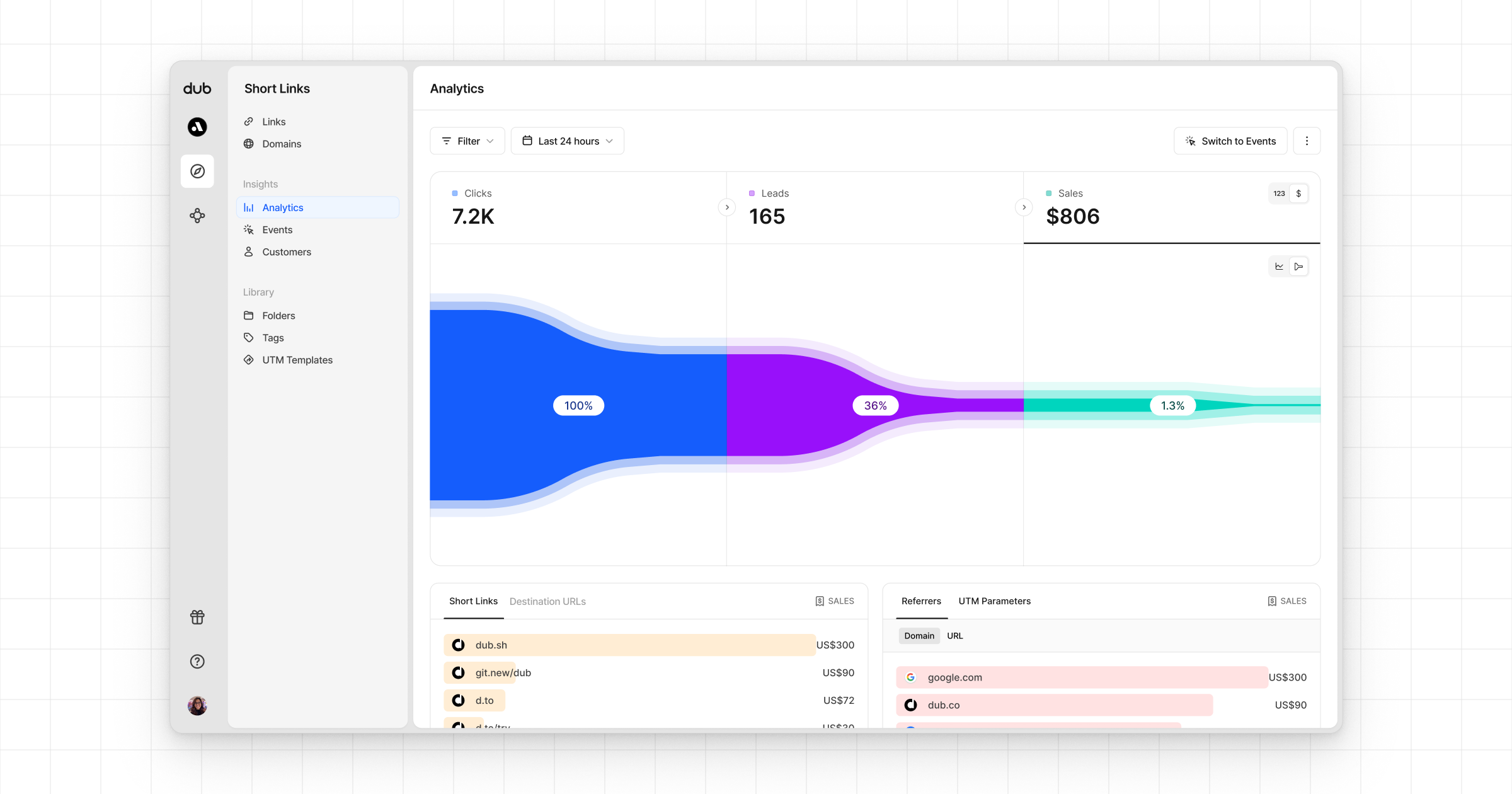
Once you've completed the setup, all your tracked conversions will show up in [Dub Analytics](https://dub.co/analytics). We provide 3 different views to help you understand your conversions:
* **Time-series**: A [time-series view](https://app.dub.co/dub/analytics?view=timeseries) of the number clicks, leads and sales.
 * **Funnel chart**: A [funnel chart view](http://app.dub.co/analytics?view=funnel) visualizing the conversion & dropoff rates across the different steps in the conversion funnel (clicks → leads → sales).
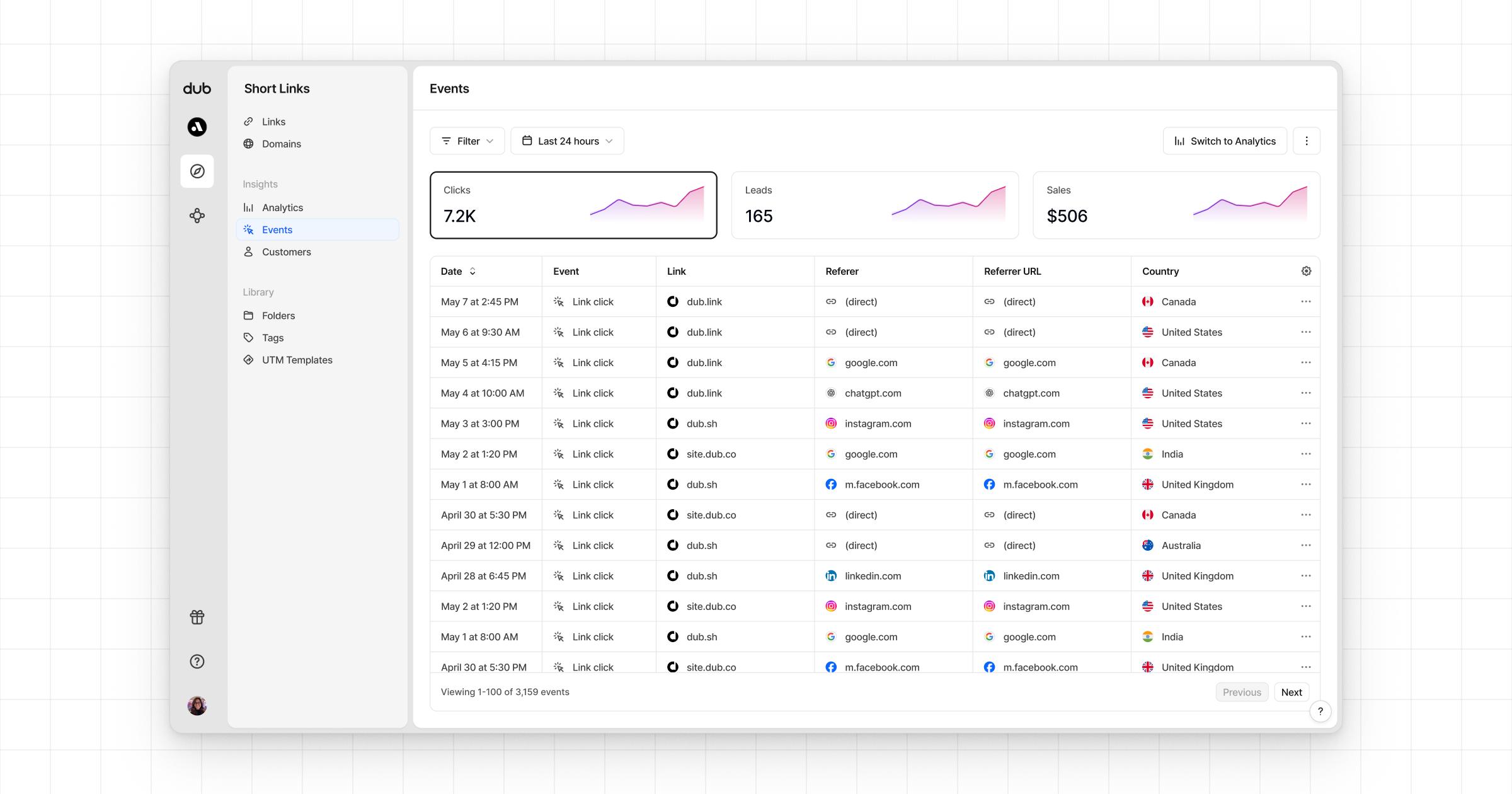
 * **Real-time events stream**: A [real-time events stream](https://app.dub.co/events) of every single conversion event that occurs across all your links in your workspace.