> ## Documentation Index
> Fetch the complete documentation index at: https://dub-mintlify-update-supabase-lead-tracking-guide-82850.mintlify.site/llms.txt
> Use this file to discover all available pages before exploring further.
# Quickstart
> Learn how to use Dub to create deep links for your mobile app (with native support for React Native, iOS, and Android).
Deep links require a [Pro plan](https://dub.co/pricing) subscription or
higher.
On Dub, you can create deep links that lets you to redirect users to a specific page within your mobile application.
 For example, you're creating an ad campaign to drive traffic to a specific product page within your mobile app.
By following the quickstart guide below, you'll be able to make sure that all your short links are set up with deep linking functionality.
## Step 1: Configure your deep link domains on Dub
Before you can create deep links, you need to configure your deep link domains in your Dub workspace. This involves adding a custom domain that will be used for your deep links and configuring your deep link configuration files.
First, you'll need to add a custom domain to your Dub workspace. Navigate to your [workspace domain settings](https://app.dub.co/settings/domains) and click **Add Domain**.
You can use a domain you already own, or leverage our [free .link domain offer](https://dub.co/help/article/free-dot-link-domain) to register a custom domain like `yourcompany.link` and use it as your deep link domain.
Once you've set up your custom domain, you'll need to upload your deep link configuration files to Dub, which we'll host under the `/.well-known/` directory of your domain.
To do that, go to your [workspace domain settings](https://app.dub.co/settings/domains) and click on the edit button for your custom domain:
For example, you're creating an ad campaign to drive traffic to a specific product page within your mobile app.
By following the quickstart guide below, you'll be able to make sure that all your short links are set up with deep linking functionality.
## Step 1: Configure your deep link domains on Dub
Before you can create deep links, you need to configure your deep link domains in your Dub workspace. This involves adding a custom domain that will be used for your deep links and configuring your deep link configuration files.
First, you'll need to add a custom domain to your Dub workspace. Navigate to your [workspace domain settings](https://app.dub.co/settings/domains) and click **Add Domain**.
You can use a domain you already own, or leverage our [free .link domain offer](https://dub.co/help/article/free-dot-link-domain) to register a custom domain like `yourcompany.link` and use it as your deep link domain.
Once you've set up your custom domain, you'll need to upload your deep link configuration files to Dub, which we'll host under the `/.well-known/` directory of your domain.
To do that, go to your [workspace domain settings](https://app.dub.co/settings/domains) and click on the edit button for your custom domain:
 In the domain modal, click on **Show advanced settings**, which will open up the Deep Link Configuration settings fields.
 **iOS (apple-app-site-association)**
For iOS apps, upload your [Apple App Site Association file ](https://developer.apple.com/documentation/xcode/supporting-associated-domains#Add-the-associated-domain-file-to-your-website) to enable iOS deep links:
```json apple-app-site-association
{
"applinks": {
"apps": [],
"details": [
{
"appID": ".",
"paths": []
}
]
}
}
```
**Android (assetlinks.json)**
For Android apps, upload your AssetLinks file to enable Android deep links:
```json assetlinks.json
[
{
"target": {
"namespace": "android_app",
"package_name": "YOUR_PACKAGE_NAME",
"sha256_cert_fingerprints": []
},
"relation": ["delegate_permission/common.handle_all_urls"]
}
]
```
Once you've set up your deep link configuration files, you can go to their respective URLs to verify that they've been configured correctly:
**iOS:** `yourdomain.link/.well-known/apple-app-site-association` [(example)](https://getacme.link/.well-known/apple-app-site-association)
**Android:** `yourdomain.link/.well-known/assetlinks.json` [(example)](https://getacme.link/.well-known/assetlinks.json)
Last but not least, you'll need to allowlist your deep link domain in your apps to allow them to redirect straight into a page within your app.
**For iOS apps**, you'll need to [allow websites to link to your apps](https://developer.apple.com/documentation/xcode/allowing-apps-and-websites-to-link-to-your-content/).
**For Android apps**, you'll need to [verify your Android app links](https://developer.android.com/training/app-links/verify-android-applinks).
## Step 2: Create your deep links on Dub
Now that you've configured your deep link domains, you can create deep links that will redirect users to specific content within your app.
Go to your [Dub dashboard](https://app.dub.co) and click **Create Link** in the top navigation bar.
Enter your destination URL in the "Destination URL" field. You can enter the URL with or without the `https://` protocol – behind the scenes, Dub will automatically make sure it's formatted correctly.
This is the URL that opens a specific screen or piece of content within your app. For example `https://yourapp.com/product/Apple-MacBook` opens the product detail screen for `Apple-MacBook`.
**iOS (apple-app-site-association)**
For iOS apps, upload your [Apple App Site Association file ](https://developer.apple.com/documentation/xcode/supporting-associated-domains#Add-the-associated-domain-file-to-your-website) to enable iOS deep links:
```json apple-app-site-association
{
"applinks": {
"apps": [],
"details": [
{
"appID": ".",
"paths": []
}
]
}
}
```
**Android (assetlinks.json)**
For Android apps, upload your AssetLinks file to enable Android deep links:
```json assetlinks.json
[
{
"target": {
"namespace": "android_app",
"package_name": "YOUR_PACKAGE_NAME",
"sha256_cert_fingerprints": []
},
"relation": ["delegate_permission/common.handle_all_urls"]
}
]
```
Once you've set up your deep link configuration files, you can go to their respective URLs to verify that they've been configured correctly:
**iOS:** `yourdomain.link/.well-known/apple-app-site-association` [(example)](https://getacme.link/.well-known/apple-app-site-association)
**Android:** `yourdomain.link/.well-known/assetlinks.json` [(example)](https://getacme.link/.well-known/assetlinks.json)
Last but not least, you'll need to allowlist your deep link domain in your apps to allow them to redirect straight into a page within your app.
**For iOS apps**, you'll need to [allow websites to link to your apps](https://developer.apple.com/documentation/xcode/allowing-apps-and-websites-to-link-to-your-content/).
**For Android apps**, you'll need to [verify your Android app links](https://developer.android.com/training/app-links/verify-android-applinks).
## Step 2: Create your deep links on Dub
Now that you've configured your deep link domains, you can create deep links that will redirect users to specific content within your app.
Go to your [Dub dashboard](https://app.dub.co) and click **Create Link** in the top navigation bar.
Enter your destination URL in the "Destination URL" field. You can enter the URL with or without the `https://` protocol – behind the scenes, Dub will automatically make sure it's formatted correctly.
This is the URL that opens a specific screen or piece of content within your app. For example `https://yourapp.com/product/Apple-MacBook` opens the product detail screen for `Apple-MacBook`.
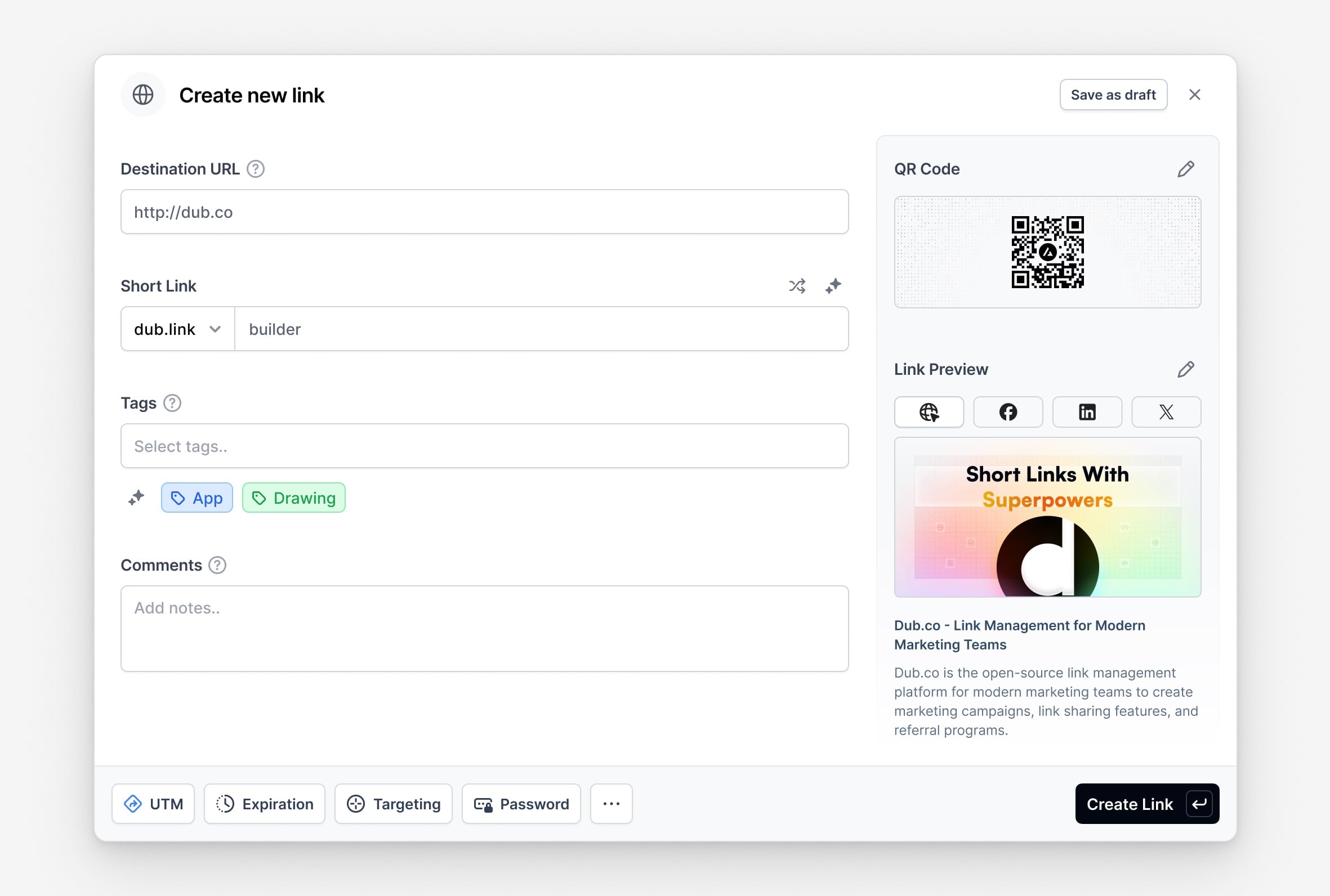 Under the Short Link field, you can either:
1. Enter your own short link slug
2. Generate a random short link slug
3. Generate a short link slug with AI.
For example, you can set a short link slug like `apple-macbook` to open the product detail screen for `Apple-MacBook`.
This step is optional. If you don't enter a short link slug, Dub will generate
a random 7-character slug for you.
[Device Targeting](https://dub.co/help/article/device-targeting) enables you to redirect users to the App Store or Google Play Store if your app isn’t installed.
For example, you can set custom destination URLs for different devices using the link builder — use the **iOS Targeting** input for iOS devices, and the **Android Targeting** input for Android devices.
Under the Short Link field, you can either:
1. Enter your own short link slug
2. Generate a random short link slug
3. Generate a short link slug with AI.
For example, you can set a short link slug like `apple-macbook` to open the product detail screen for `Apple-MacBook`.
This step is optional. If you don't enter a short link slug, Dub will generate
a random 7-character slug for you.
[Device Targeting](https://dub.co/help/article/device-targeting) enables you to redirect users to the App Store or Google Play Store if your app isn’t installed.
For example, you can set custom destination URLs for different devices using the link builder — use the **iOS Targeting** input for iOS devices, and the **Android Targeting** input for Android devices.
 Finally, click **Create link** to create your deep link. This link will act as a Firebase Dynamic Link replacement.
Dub's link builder offers many additional features like UTM builder, password
protection, expiration dates, geo targeting, and more. [Learn more about
creating links on Dub](https://dub.co/help/article/how-to-create-link) to
explore all available options.
## Step 3: Handling deep link redirects in your app
When a user opens your app from a deep link, you need to handle two main scenarios:
### Scenario 1: User has your app installed
When your app is already installed, the deep link will open your app directly.
You may handle the deep link manually or with the supported mobile SDKs.
**Option 1**: Handle the deep link using a supported [Dub Mobile SDK](/sdks/client-side-mobile/introduction) (iOS & React Native only)
Follow our installation guide for [Swift](/sdks/client-side-mobile/installation-guides/swift) or [React Native](/sdks/client-side-mobile/installation-guides/react-native) to get started.
```typescript React Native expandable
import { useState, useEffect, useRef } from "react";
import { Linking } from "react-native";
import AsyncStorage from "@react-native-async-storage/async-storage";
import dub from "@dub/react-native";
export default function App() {
useEffect(() => {
dub.init({
publishableKey: "",
domain: "",
});
// Check if this is first launch
const isFirstLaunch = await AsyncStorage.getItem("is_first_launch");
if (isFirstLaunch === null) {
await handleFirstLaunch();
await AsyncStorage.setItem("is_first_launch", "false");
} else {
// Handle initial deep link url (Android only)
const url = await Linking.getInitialURL();
if (url) {
await handleDeepLink(url);
}
}
const linkingListener = Linking.addEventListener("url", (event) => {
handleDeepLink(event.url);
});
return () => {
linkingListener.remove();
};
}, []);
const handleFirstLaunch = async (
deepLinkUrl?: string | null | undefined
): Promise => {
try {
const response = await dub.trackOpen(deepLinkUrl);
const destinationURL = response.link?.url;
// Navigate to the destination URL
} catch (error) {
// Handle error
}
};
// Return your app...
}
```
```swift iOS (SwiftUI) expandable
// ContentView.swift
import SwiftUI
import Dub
struct ContentView: View {
@Environment(\.dub) var dub: Dub
@AppStorage("is_first_launch") private var isFirstLaunch = true
var body: some View {
NavigationStack {
VStack {
// Your app content
}
.onOpenURL { url in
trackOpen(deepLink: url)
}
.onAppear {
if isFirstLaunch {
trackOpen()
isFirstLaunch = false
}
}
}
}
private func trackOpen(deepLink: URL? = nil) {
Task {
do {
let response = try await dub.trackOpen(deepLink: deepLink)
// Obtain the destination URL from the response
guard let url = response.link?.url else {
return
}
// Navigate to the destination URL
} catch let error as DubError {
print(error.localizedDescription)
}
}
}
}
```
```swift iOS (UIKit) expandable
import UIKit
import Dub
@main
class AppDelegate: UIResponder, UIApplicationDelegate {
var window: UIWindow?
private let dubPublishableKey = ""
private let dubDomain = ""
private var isFirstLaunch: Bool {
get {
UserDefaults.standard.object(forKey: "is_first_launch") as? Bool ?? true
}
set {
UserDefaults.standard.set(newValue, forKey: "is_first_launch")
}
}
func application(_ application: UIApplication, didFinishLaunchingWithOptions launchOptions: [UIApplication.LaunchOptionsKey: Any]?) -> Bool {
Dub.setup(publishableKey: dubPublishableKey, domain: dubDomain)
// Track first launch
if isFirstLaunch {
trackOpen()
isFirstLaunch = false
}
// Override point for customization after application launch.
return true
}
func application(_ app: UIApplication, open url: URL, options: [UIApplication.OpenURLOptionsKey : Any] = [:]) -> Bool {
handleDeepLink(url: url)
return true
}
func handleDeepLink(url: URL) {
trackOpen(deepLink: url)
}
private func trackOpen(deepLink: URL? = nil) {
// Call the tracking endpoint with the full deep link URL
Task {
do {
let response = try await Dub.shared.trackOpen(deepLink: deepLink)
print(response)
// Navigate to final link via link.url
guard let destinationUrl = response.link?.url else {
return
}
// Navigate to the destination URL
} catch let error as DubError {
print(error.localizedDescription)
}
}
}
}
```
**Option 2**: Handle the deep link manually
Your app will receive the deep link URL when it opens. The URL will be in the format: `https://yourdomain.link/short-link-slug`
```javascript React Native
// App.js
import { useEffect } from "react";
import { Linking } from "react-native";
useEffect(() => {
const handleDeepLink = (url) => {
try {
// Call the tracking endpoint with the full deep link URL
trackDeepLinkClick(url);
} catch (error) {
console.error("Error handling deep link URL:", error);
}
};
// Handle deep link when app is already running
const subscription = Linking.addEventListener("url", (event) => {
handleDeepLink(event.url);
});
// Handle deep link when app is opened from a deep link
Linking.getInitialURL().then((url) => {
if (url) {
handleDeepLink(url);
}
});
return () => {
subscription?.remove();
};
}, []);
```
```swift iOS (UIKit)
// AppDelegate.swift
func application(_ app: UIApplication, open url: URL, options: [UIApplication.OpenURLOptionsKey : Any] = [:]) -> Bool {
handleDeepLink(url: url)
return true
}
func handleDeepLink(url: URL) {
// Call the tracking endpoint with the full deep link URL
trackDeepLinkClick(deepLink: url.absoluteString)
}
```
```swift iOS (SwiftUI)
// ContentView.swift
struct ContentView: View {
var body: some View {
NavigationStack {
VStack {
//... your app content
}
.onOpenURL { url in
// Call the tracking endpoint with the full deep link URL
trackDeepLinkClick(deepLink: url.absoluteString)
}
}
}
}
```
```kotlin Android
// MainActivity.kt
override fun onNewIntent(intent: Intent?) {
super.onNewIntent(intent)
intent?.data?.let { uri ->
handleDeepLink(uri)
}
}
private fun handleDeepLink(uri: Uri) {
// Call the tracking endpoint with the full deep link URL
trackDeepLinkClick(uri.toString())
}
```
Once you’ve detected and parsed the deep link, you should track the open event using Dub's API, which will return the final destination URL in the API response.
To do this, make a `POST` request to the [`/track/open` endpoint](/api-reference/endpoint/track-open) with the following body:
```json
{
"deepLink": "https://yourdomain.link/short-link-slug"
}
```
The response will be a JSON object with the following structure if the request is successful:
```json
{
"clickId": "ASltDhoxBiBqKH00",
"link": {
"id": "link_1K9XQTLF7OSH3Z48DKQ5WSRVY",
"domain": "yourdomain.link",
"key": "short-link-slug",
"url": "https://yourapp.com/product/Apple-MacBook"
}
}
```
Now you've got the destination URL (via `link.url`), you can navigate the user to the correct screen in your app.
Here's the full example code for React Native, iOS, and Android.
```javascript React Native
// DeepLinkTracker.js
async function trackDeepLinkClick(deepLink) {
try {
const response = await fetch(`https://api.dub.co/track/open`, {
method: "POST",
headers: {
"Content-Type": "application/json",
},
body: JSON.stringify({
deepLink,
}),
});
if (response.ok) {
const data = await response.json();
const destinationUrl = data.link.url;
// Navigate to the destination URL in your app
navigateToDestination(destinationUrl);
}
} catch (error) {
console.error("Error tracking deep link:", error);
}
}
```
```swift iOS
// DeepLinkTracker.swift
func trackDeepLinkClick(deepLink: String) {
let url = URL(string: "https://api.dub.co/track/open")!
var request = URLRequest(url: url)
request.httpMethod = "POST"
request.setValue("application/json", forHTTPHeaderField: "Content-Type")
let body = [
"deepLink": deepLink,
]
request.httpBody = try? JSONSerialization.data(withJSONObject: body)
URLSession.shared.dataTask(with: request) { data, response, error in
if let data = data,
let json = try? JSONSerialization.jsonObject(with: data) as? [String: Any],
let link = json["link"] as? [String: Any],
let destinationUrl = link["url"] as? String {
DispatchQueue.main.async {
self.navigateToDestination(destinationUrl)
}
}
}.resume()
}
```
```kotlin Android
// DeepLinkTracker.kt
private fun trackDeepLinkClick(deepLink: String) {
val url = URL("https://api.dub.co/track/open")
val connection = url.openConnection() as HttpURLConnection
connection.requestMethod = "POST"
connection.setRequestProperty("Content-Type", "application/json")
connection.doOutput = true
val body = JSONObject().apply {
put("deepLink", deepLink)
}
connection.outputStream.use { os ->
os.write(body.toString().toByteArray())
}
val response = connection.inputStream.bufferedReader().use { it.readText() }
val jsonResponse = JSONObject(response)
val link = jsonResponse.getJSONObject("link")
val destinationUrl = link.getString("url")
runOnUiThread {
navigateToDestination(destinationUrl)
}
}
```
### Scenario 2: User doesn't have your app installed
When your app isn't installed, the user will be redirected to the App Store or Google Play Store since you've enabled [device targeting](https://dub.co/help/article/device-targeting) in Step 2 above.
After they install and open your app, you'll need to use [deferred deep linking](/concepts/deep-links/deferred-deep-linking) to:
1. Retrieve the short link that brought the user to the app store
2. Track the open event via the [`/track/open` endpoint](/api-reference/endpoint/track-open)
3. Redirect the user to the final destination URL
For detailed implementation of deferred deep linking, including how to use the
Google Play Store Install Referrer API and other services, see our [Deferred
Deep Linking](/concepts/deep-links/deferred-deep-linking) guide.
## Test your deep links
Before deploying your deep links to production, test them thoroughly using emulators to ensure they work correctly.
Use the Android Debug Bridge (adb) to test your deep links on an Android emulator:
```bash
adb shell am start -W -a android.intent.action.VIEW -d "https://yourdomain.link/your-short-link" com.yourpackage.name
```
Use the `xcrun` command to test your deep links on an iOS simulator:
```bash
xcrun simctl openurl booted "https://yourdomain.link/your-short-link"
```
You can also test your deep links by opening them from a messaging app on your device:
1. Open a messaging app (like Messages, WhatsApp, or Telegram) on your device
2. Send yourself a message containing your deep link URL
3. Tap on the link in the message
4. The link should either open your app directly or redirect to the appropriate app store
Finally, click **Create link** to create your deep link. This link will act as a Firebase Dynamic Link replacement.
Dub's link builder offers many additional features like UTM builder, password
protection, expiration dates, geo targeting, and more. [Learn more about
creating links on Dub](https://dub.co/help/article/how-to-create-link) to
explore all available options.
## Step 3: Handling deep link redirects in your app
When a user opens your app from a deep link, you need to handle two main scenarios:
### Scenario 1: User has your app installed
When your app is already installed, the deep link will open your app directly.
You may handle the deep link manually or with the supported mobile SDKs.
**Option 1**: Handle the deep link using a supported [Dub Mobile SDK](/sdks/client-side-mobile/introduction) (iOS & React Native only)
Follow our installation guide for [Swift](/sdks/client-side-mobile/installation-guides/swift) or [React Native](/sdks/client-side-mobile/installation-guides/react-native) to get started.
```typescript React Native expandable
import { useState, useEffect, useRef } from "react";
import { Linking } from "react-native";
import AsyncStorage from "@react-native-async-storage/async-storage";
import dub from "@dub/react-native";
export default function App() {
useEffect(() => {
dub.init({
publishableKey: "",
domain: "",
});
// Check if this is first launch
const isFirstLaunch = await AsyncStorage.getItem("is_first_launch");
if (isFirstLaunch === null) {
await handleFirstLaunch();
await AsyncStorage.setItem("is_first_launch", "false");
} else {
// Handle initial deep link url (Android only)
const url = await Linking.getInitialURL();
if (url) {
await handleDeepLink(url);
}
}
const linkingListener = Linking.addEventListener("url", (event) => {
handleDeepLink(event.url);
});
return () => {
linkingListener.remove();
};
}, []);
const handleFirstLaunch = async (
deepLinkUrl?: string | null | undefined
): Promise => {
try {
const response = await dub.trackOpen(deepLinkUrl);
const destinationURL = response.link?.url;
// Navigate to the destination URL
} catch (error) {
// Handle error
}
};
// Return your app...
}
```
```swift iOS (SwiftUI) expandable
// ContentView.swift
import SwiftUI
import Dub
struct ContentView: View {
@Environment(\.dub) var dub: Dub
@AppStorage("is_first_launch") private var isFirstLaunch = true
var body: some View {
NavigationStack {
VStack {
// Your app content
}
.onOpenURL { url in
trackOpen(deepLink: url)
}
.onAppear {
if isFirstLaunch {
trackOpen()
isFirstLaunch = false
}
}
}
}
private func trackOpen(deepLink: URL? = nil) {
Task {
do {
let response = try await dub.trackOpen(deepLink: deepLink)
// Obtain the destination URL from the response
guard let url = response.link?.url else {
return
}
// Navigate to the destination URL
} catch let error as DubError {
print(error.localizedDescription)
}
}
}
}
```
```swift iOS (UIKit) expandable
import UIKit
import Dub
@main
class AppDelegate: UIResponder, UIApplicationDelegate {
var window: UIWindow?
private let dubPublishableKey = ""
private let dubDomain = ""
private var isFirstLaunch: Bool {
get {
UserDefaults.standard.object(forKey: "is_first_launch") as? Bool ?? true
}
set {
UserDefaults.standard.set(newValue, forKey: "is_first_launch")
}
}
func application(_ application: UIApplication, didFinishLaunchingWithOptions launchOptions: [UIApplication.LaunchOptionsKey: Any]?) -> Bool {
Dub.setup(publishableKey: dubPublishableKey, domain: dubDomain)
// Track first launch
if isFirstLaunch {
trackOpen()
isFirstLaunch = false
}
// Override point for customization after application launch.
return true
}
func application(_ app: UIApplication, open url: URL, options: [UIApplication.OpenURLOptionsKey : Any] = [:]) -> Bool {
handleDeepLink(url: url)
return true
}
func handleDeepLink(url: URL) {
trackOpen(deepLink: url)
}
private func trackOpen(deepLink: URL? = nil) {
// Call the tracking endpoint with the full deep link URL
Task {
do {
let response = try await Dub.shared.trackOpen(deepLink: deepLink)
print(response)
// Navigate to final link via link.url
guard let destinationUrl = response.link?.url else {
return
}
// Navigate to the destination URL
} catch let error as DubError {
print(error.localizedDescription)
}
}
}
}
```
**Option 2**: Handle the deep link manually
Your app will receive the deep link URL when it opens. The URL will be in the format: `https://yourdomain.link/short-link-slug`
```javascript React Native
// App.js
import { useEffect } from "react";
import { Linking } from "react-native";
useEffect(() => {
const handleDeepLink = (url) => {
try {
// Call the tracking endpoint with the full deep link URL
trackDeepLinkClick(url);
} catch (error) {
console.error("Error handling deep link URL:", error);
}
};
// Handle deep link when app is already running
const subscription = Linking.addEventListener("url", (event) => {
handleDeepLink(event.url);
});
// Handle deep link when app is opened from a deep link
Linking.getInitialURL().then((url) => {
if (url) {
handleDeepLink(url);
}
});
return () => {
subscription?.remove();
};
}, []);
```
```swift iOS (UIKit)
// AppDelegate.swift
func application(_ app: UIApplication, open url: URL, options: [UIApplication.OpenURLOptionsKey : Any] = [:]) -> Bool {
handleDeepLink(url: url)
return true
}
func handleDeepLink(url: URL) {
// Call the tracking endpoint with the full deep link URL
trackDeepLinkClick(deepLink: url.absoluteString)
}
```
```swift iOS (SwiftUI)
// ContentView.swift
struct ContentView: View {
var body: some View {
NavigationStack {
VStack {
//... your app content
}
.onOpenURL { url in
// Call the tracking endpoint with the full deep link URL
trackDeepLinkClick(deepLink: url.absoluteString)
}
}
}
}
```
```kotlin Android
// MainActivity.kt
override fun onNewIntent(intent: Intent?) {
super.onNewIntent(intent)
intent?.data?.let { uri ->
handleDeepLink(uri)
}
}
private fun handleDeepLink(uri: Uri) {
// Call the tracking endpoint with the full deep link URL
trackDeepLinkClick(uri.toString())
}
```
Once you’ve detected and parsed the deep link, you should track the open event using Dub's API, which will return the final destination URL in the API response.
To do this, make a `POST` request to the [`/track/open` endpoint](/api-reference/endpoint/track-open) with the following body:
```json
{
"deepLink": "https://yourdomain.link/short-link-slug"
}
```
The response will be a JSON object with the following structure if the request is successful:
```json
{
"clickId": "ASltDhoxBiBqKH00",
"link": {
"id": "link_1K9XQTLF7OSH3Z48DKQ5WSRVY",
"domain": "yourdomain.link",
"key": "short-link-slug",
"url": "https://yourapp.com/product/Apple-MacBook"
}
}
```
Now you've got the destination URL (via `link.url`), you can navigate the user to the correct screen in your app.
Here's the full example code for React Native, iOS, and Android.
```javascript React Native
// DeepLinkTracker.js
async function trackDeepLinkClick(deepLink) {
try {
const response = await fetch(`https://api.dub.co/track/open`, {
method: "POST",
headers: {
"Content-Type": "application/json",
},
body: JSON.stringify({
deepLink,
}),
});
if (response.ok) {
const data = await response.json();
const destinationUrl = data.link.url;
// Navigate to the destination URL in your app
navigateToDestination(destinationUrl);
}
} catch (error) {
console.error("Error tracking deep link:", error);
}
}
```
```swift iOS
// DeepLinkTracker.swift
func trackDeepLinkClick(deepLink: String) {
let url = URL(string: "https://api.dub.co/track/open")!
var request = URLRequest(url: url)
request.httpMethod = "POST"
request.setValue("application/json", forHTTPHeaderField: "Content-Type")
let body = [
"deepLink": deepLink,
]
request.httpBody = try? JSONSerialization.data(withJSONObject: body)
URLSession.shared.dataTask(with: request) { data, response, error in
if let data = data,
let json = try? JSONSerialization.jsonObject(with: data) as? [String: Any],
let link = json["link"] as? [String: Any],
let destinationUrl = link["url"] as? String {
DispatchQueue.main.async {
self.navigateToDestination(destinationUrl)
}
}
}.resume()
}
```
```kotlin Android
// DeepLinkTracker.kt
private fun trackDeepLinkClick(deepLink: String) {
val url = URL("https://api.dub.co/track/open")
val connection = url.openConnection() as HttpURLConnection
connection.requestMethod = "POST"
connection.setRequestProperty("Content-Type", "application/json")
connection.doOutput = true
val body = JSONObject().apply {
put("deepLink", deepLink)
}
connection.outputStream.use { os ->
os.write(body.toString().toByteArray())
}
val response = connection.inputStream.bufferedReader().use { it.readText() }
val jsonResponse = JSONObject(response)
val link = jsonResponse.getJSONObject("link")
val destinationUrl = link.getString("url")
runOnUiThread {
navigateToDestination(destinationUrl)
}
}
```
### Scenario 2: User doesn't have your app installed
When your app isn't installed, the user will be redirected to the App Store or Google Play Store since you've enabled [device targeting](https://dub.co/help/article/device-targeting) in Step 2 above.
After they install and open your app, you'll need to use [deferred deep linking](/concepts/deep-links/deferred-deep-linking) to:
1. Retrieve the short link that brought the user to the app store
2. Track the open event via the [`/track/open` endpoint](/api-reference/endpoint/track-open)
3. Redirect the user to the final destination URL
For detailed implementation of deferred deep linking, including how to use the
Google Play Store Install Referrer API and other services, see our [Deferred
Deep Linking](/concepts/deep-links/deferred-deep-linking) guide.
## Test your deep links
Before deploying your deep links to production, test them thoroughly using emulators to ensure they work correctly.
Use the Android Debug Bridge (adb) to test your deep links on an Android emulator:
```bash
adb shell am start -W -a android.intent.action.VIEW -d "https://yourdomain.link/your-short-link" com.yourpackage.name
```
Use the `xcrun` command to test your deep links on an iOS simulator:
```bash
xcrun simctl openurl booted "https://yourdomain.link/your-short-link"
```
You can also test your deep links by opening them from a messaging app on your device:
1. Open a messaging app (like Messages, WhatsApp, or Telegram) on your device
2. Send yourself a message containing your deep link URL
3. Tap on the link in the message
4. The link should either open your app directly or redirect to the appropriate app store